For iPhone & Android
App
Privacy & security
App lock, touch protection, footage that stays yours.
Without a Cloud plan, your footage stays on your phone and Dashivo™ sends Angry Owl Labs nothing but update checks: no location, no footage, no tracking. On top of your phone's own lock, Dashivo has one of its own, so someone who gets into your phone still can't watch, share or delete your recordings.
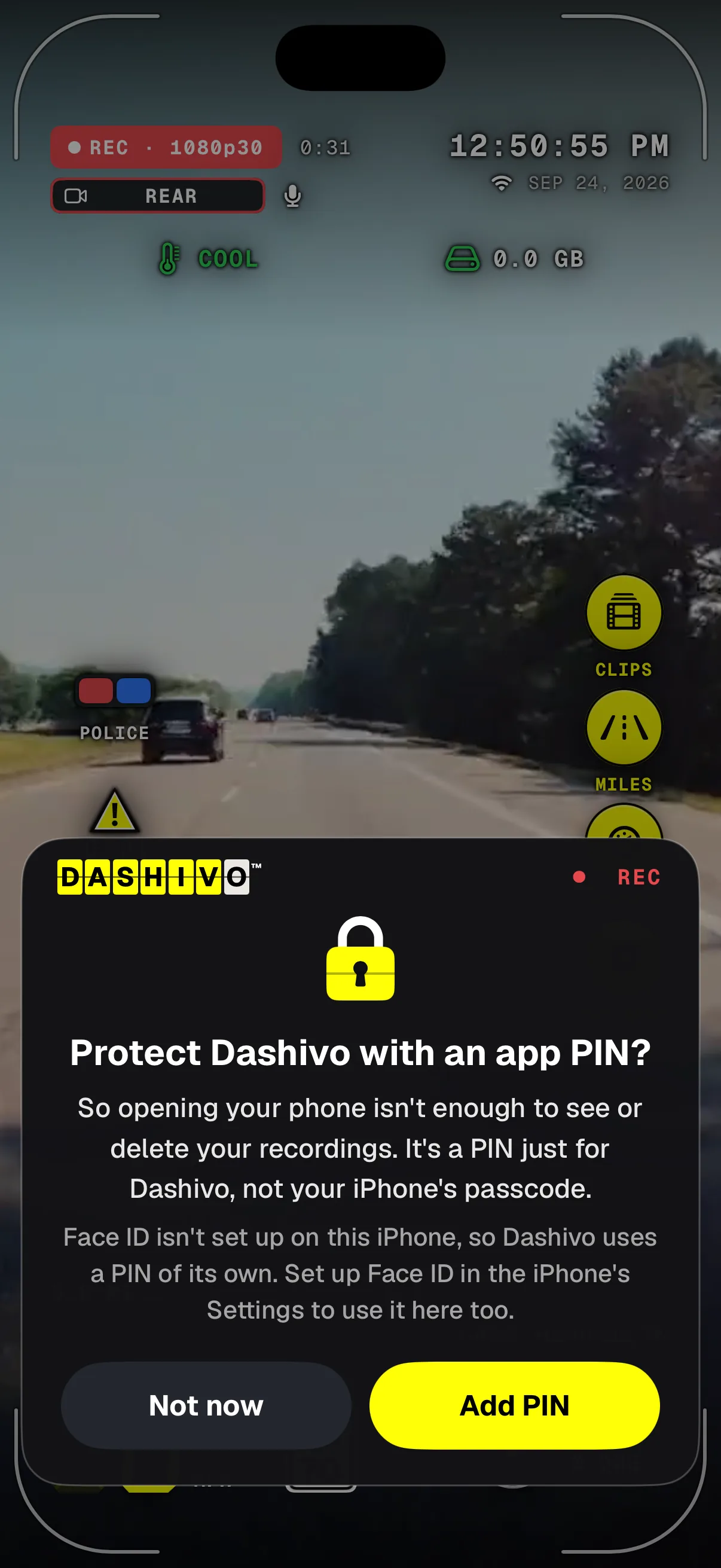
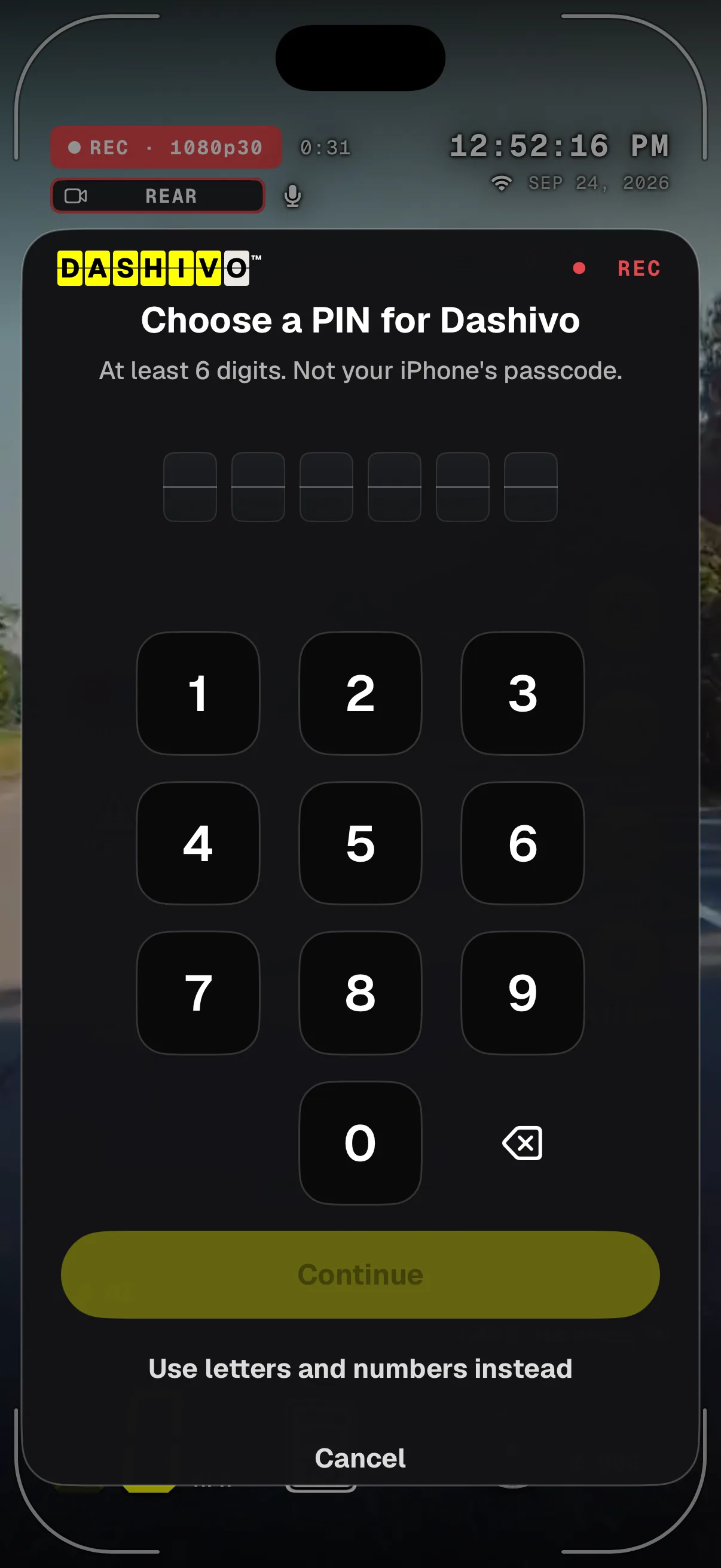
- Still recordingThe offer sits over the drive; recording carries on behind it.
- A lock of its ownOn top of your phone's lock, just for Dashivo.
- Unlocked isn't enoughSomeone holding your unlocked phone still can't watch, share or delete.
- Not now?It asks once more a week later, then never. Settings › App lock any time.
- RECRecording never stops while you choose.
- Dashivo's own PIN6 digits or more, never your phone's passcode.
- Easy ones refusedRepeats like 111111 and runs like 123456 don't count.
- Letters tooOr a longer passcode with letters and numbers.
The app lock's first-launch offer and the PIN pad, from the iPhone app.
What leaves your phone
- Footage
- Nothing, without a Cloud plan. It stays on your phone: in Dashivo, Photos, the Gallery or your own drive.
- Updates
- The one thing the app asks us: whether there's a newer version.
- Speed limits
- The sign asks OpenStreetMap's public servers for the roads around you, using an approximate location. Not us.
- Streets
- Street and city names come from your phone's own map service, from Apple or Google.
- Bug reports
- Only when you send one, and you see every word first. Never your location or your videos.
- Ads
- None. No ads, no selling data, no analytics, no tracking. Plans are how we're paid.
The details are in the app's Privacy Policy and the website privacy notice, both drafts pending legal review.
The app lock
- Face ID, a PIN, or both
- Face ID or Touch ID (a face or fingerprint on Android), Dashivo's own PIN, or both, one after the other.
- Never your phone's passcode
- The PIN is Dashivo's own. Face ID never falls back to your phone's passcode, so unlocking the phone isn't enough.
- Never while it's on screen
- It asks only after Dashivo has been off the screen for the time you choose: right away, 1, 5 or 15 minutes. Recording carries on behind it.
- Wrong PINs only cost time
- 30 seconds after five wrong tries, then 1, 5 and 15 minutes, then an hour. Nothing is ever erased: the recordings are evidence.
- PIN only at a stop
- If you choose, only the PIN opens Dashivo during a police stop and for 30 minutes after it. Face ID is off then.
- Clips inside Dashivo
- Keep clips out of the Files app or the Gallery, and out of their backups, so the lock covers them too.
The app lock guards Dashivo's screens, and the app switcher shows a plain cover instead of what was on screen. It doesn't encrypt the video files, and anyone with your phone unlocked can still delete the app, which deletes the clips on it. The PIN is kept only as a salted, slow hash on this phone, never in a backup. Laws on unlocking phones differ by state; this isn't legal advice.
Where it stands
Works today
- App lock: Face ID or Touch ID, Dashivo's own PIN, or both
- PIN only during a police stop and 30 minutes after
- Touch protection and Screen off
- Clips kept inside Dashivo
- No footage sent to us without Cloud
- Download or delete your account data
Coming soon
- Dashivo Cloud: encrypted on your phone, stored in separate pieces
- Sharing only with people you choose
- Cloud+: the “if I'm detained” hand-off
Dashivo Hub Coming Soon
- Private, offline storage hidden in your car
Pocket-proof,
still recording.
In a pocket, on a strap or on a vest, the screen gets pressed by accident. Touch protection keeps recording, turns the screen black and dim with a big REC, and ignores every touch until you hold the unlock button for a second and a half. Screen off goes fully black and keeps recording too.
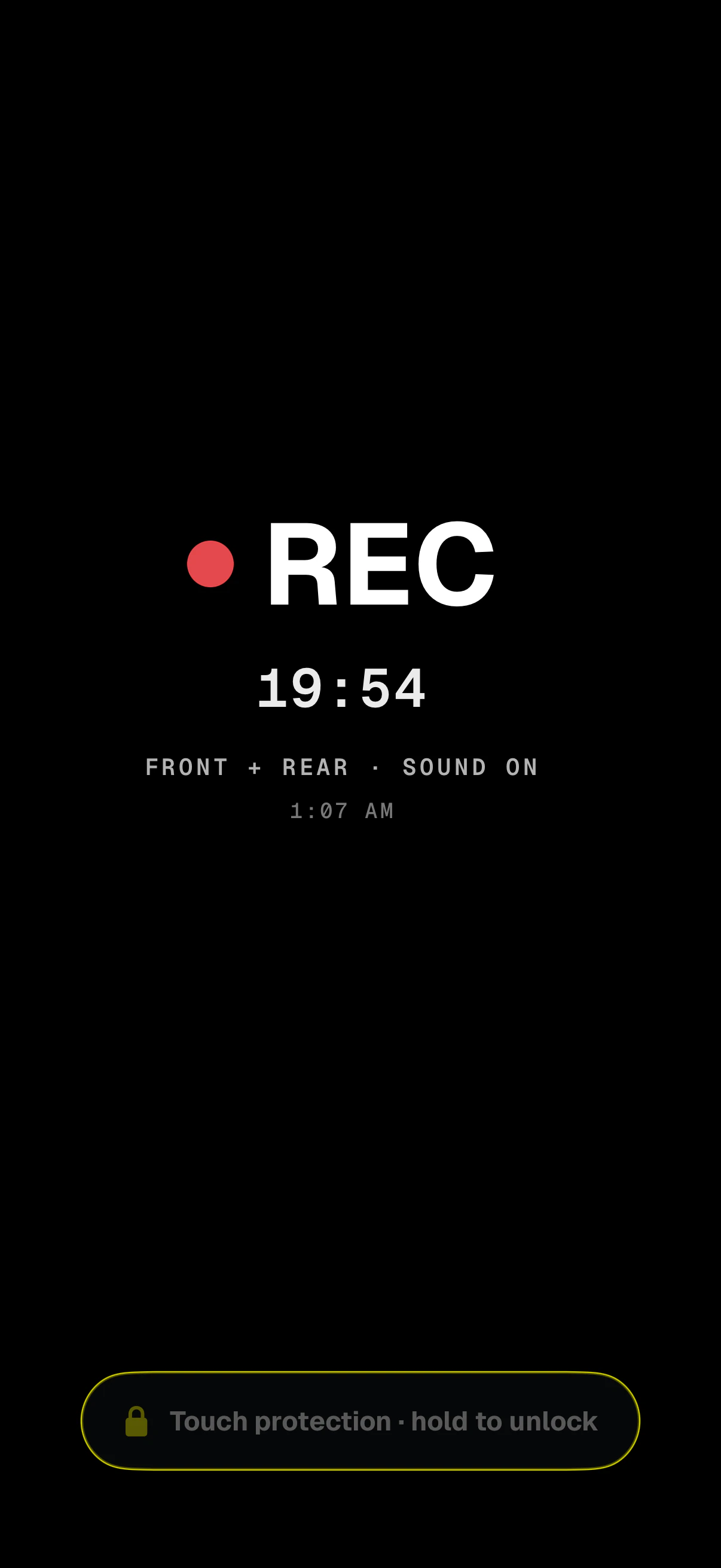
- How longTime since this recording started.
- Hold to unlockA second and a half. Every other touch is ignored.
- Still recordingA big REC, so you can see it's running at a glance.
- Cameras and soundFront and rear, each saved as its own file.
Dashivo can offer Touch protection when body cam recording starts, turn it on by itself, or never ask. On iPhone, don't press the side button: Apple stops the camera while the iPhone is locked.
Encrypted on
your phone.
When Dashivo Cloud arrives, the clips that matter are encrypted on your phone before they leave it and stored in separate pieces. We can't watch them, and neither could anyone who broke into our servers. The keys stay on your devices: lose them and nobody can recover the footage, including us.
- Encrypted on the phone Coming soon
- Each clip is locked on your phone with keys only your devices hold.
- Stored in pieces Coming soon
- Split into separate pieces, kept apart. No single piece is your video.
- Shared only by you Coming soon
- Sharing, and Cloud+'s “if I'm detained” hand-off, go only to people you choose.
- Devices, if you like
- Adding a phone to your account is optional. It sends only its name, type, model and app version.
- Your data, your call
- Download everything we keep about you as a file, or delete your account, at your account.
- No ads, no selling
- There are no ads in Dashivo and we never sell data.
Deleting your account doesn't cancel a store subscription; cancel that in the App Store or Google Play.
Download
Drive with a
witness.
Dashivo™ is free for iPhone and Android. Get the app, mount your phone, and your next drive is on the record.
Nothing new to buy · No account needed · Footage stays on your phone