For iPhone & Android
App
The app · iPhone & Android
Everything, in the
phone you carry.
Dashivo™ is a dash cam, a body cam and a one-tap police stop in one app. It stamps every frame with the time, your speed and where you were, shows the posted limit for your road, and keeps your footage on your phone. Upright or sideways, it looks like this while it records.
- Free
- to download and record
- $9.99
- once for Pro
- 2
- platforms: iPhone and Android
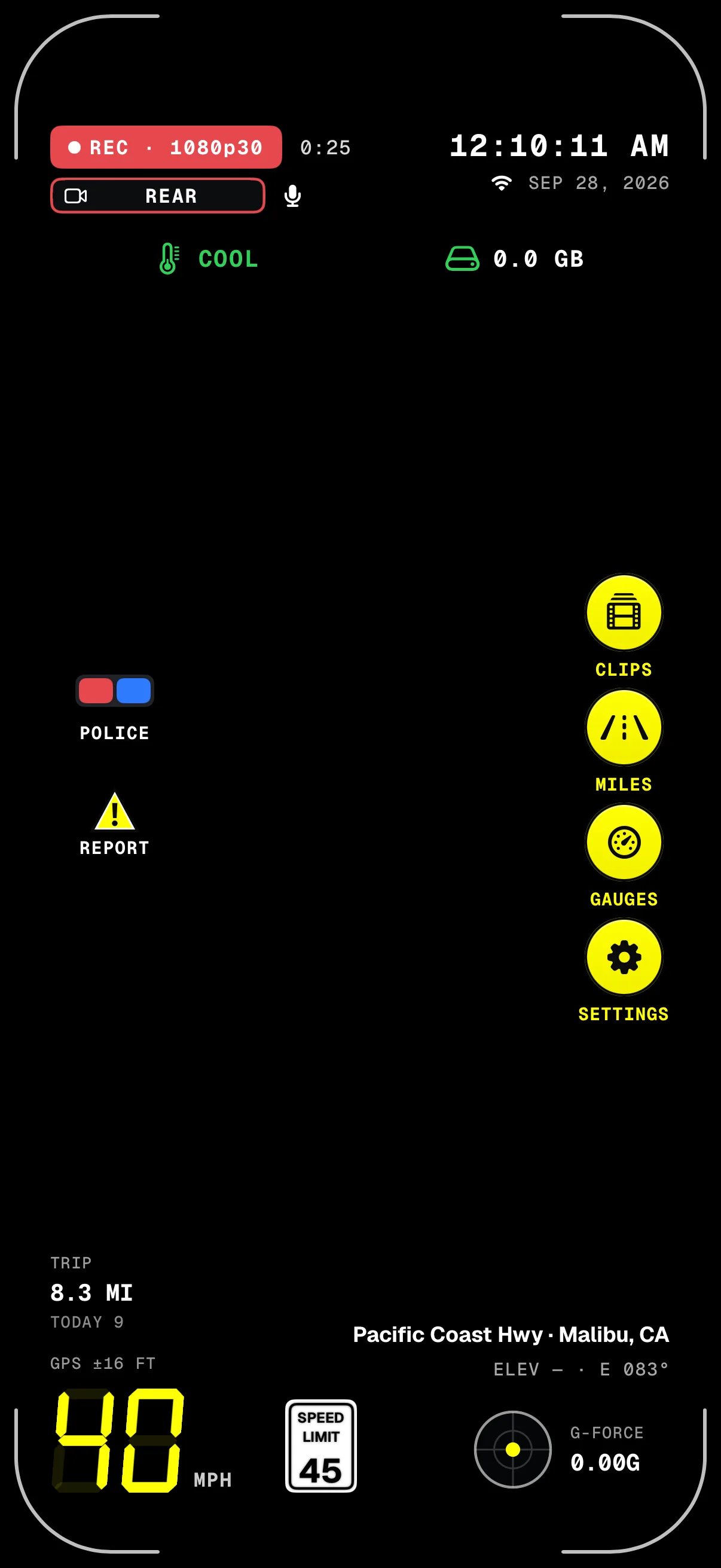
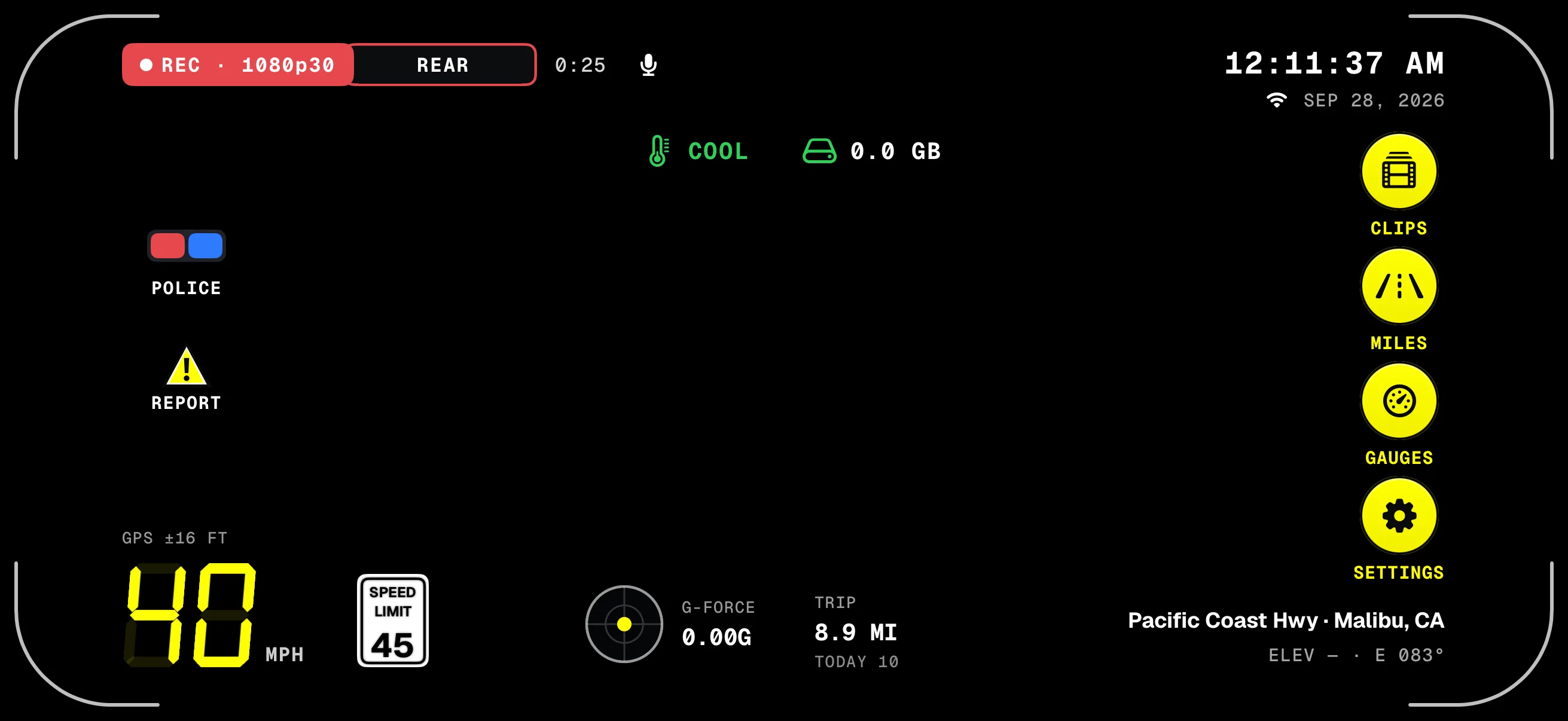
- REC & clip clockRecording, the quality, and how long it's been rolling.
- POLICEOne tap: records until you end it, saved every few seconds.
- REPORTMark a speed trap, a hazard or an accident.
- Speed & limitThe posted limit for your road; the sign rings red at 5 mph over.
- Clock & dateThe same time and date that's stamped on the video.
- The railClips, Miles, Gauges and Settings, one tap away.
- Street & headingWhere you are, looked up on the phone.
Screens from the iPhone app on a simulated drive. The road behind them is added for this page; in the app it's your camera.
01 · Dash cam & HUD
Everything you need,
nothing in the way.
The HUD keeps the numbers that matter around the edge of the picture, each carrying a black shadow that grows stronger over a bright sky. The stamp burns the same facts into every frame of the video.
- REC & clip clockRecording, 4K or Full HD, and how long this recording has run.
- POLICEStarts a police stop: records until you end it, saved every few seconds.
- REPORTSpeed trap, hazard or accident, marked with where and when.
- Trip & todayMiles this trip and since midnight, from GPS.
- Speed & limitThe posted limit, from OpenStreetMap. Rings red at 5 mph over; three digits when you need them.
- Clock & dateMonth, day and year: what's stamped on the video.
- Heat & spaceThe phone's heat level, uploads and the storage Dashivo is using.
- The railClips, Miles, Gauges and Settings, one tap away.
- Street & headingLooked up on the phone; coordinates are saved either way.
- G-forceEvery bump and brake, stamped on the frame.
The road ahead.
The cabin behind.
With Pro, Dash cam mode records both cameras at once: the road through the windshield on the rear camera and the cabin and your riders on the front camera, with sound, each into its own file. The HUD, the speed-limit sign and loop recording carry on as always. Made for rideshare and delivery drivers on Uber, Lyft, DoorDash, Instacart and the rest.
- Dash cam · Pro
- Body cam · free

- Road aheadThe rear camera, through the windshield. 1080p while both cameras record.
- CabinThe front camera, with sound: the front seats and your riders in the back.
- Magnetic mountBelow the mirror, where your state allows. It bends, tilts, swivels and rotates; phones without MagSafe take a thin plate.
- Second phoneOn the rear shelf or rear window: the road behind. Free, and it records on its own.
- USB-C powerKeep it charging, most of all with both cameras on. Each phone needs its own.
Each camera, its own fileNamed to the second, so the road, the cabin and the road behind line up.
- or on the dash
- or on the console
An original 3D illustration, not footage. Windshield mounting rules vary by state, so mount where yours allows; the dash or the console is the easy option. What's allowed
- On screen
- The road fills the screen and the cabin shows in a small picture. REC says FRONT + REAR.
- Two files
- Each camera saves its own video, 1080p each, named with the date, the time to the second and the camera.
- Which phones
- iPhone XS and XR and newer, and many recent Android phones. Which phones work
- Riders and sound
- Tell riders they're on camera. Check your platform's rules and your state's recording laws.
Uber, Lyft, DoorDash and Instacart are trademarks of their owners. Dashivo isn't affiliated with them.
02 · Dashboard & Stopwatch · Pro
A supercar cluster
for your phone.
Switch the HUD to gauges: a speed sweep with the posted limit, live G-force with its peak, trip and today, and big POLICE and REPORT buttons. The Stopwatch times 0–60, the quarter mile and braking, with AUTO start and the result stamped on the video. Closed courses only.
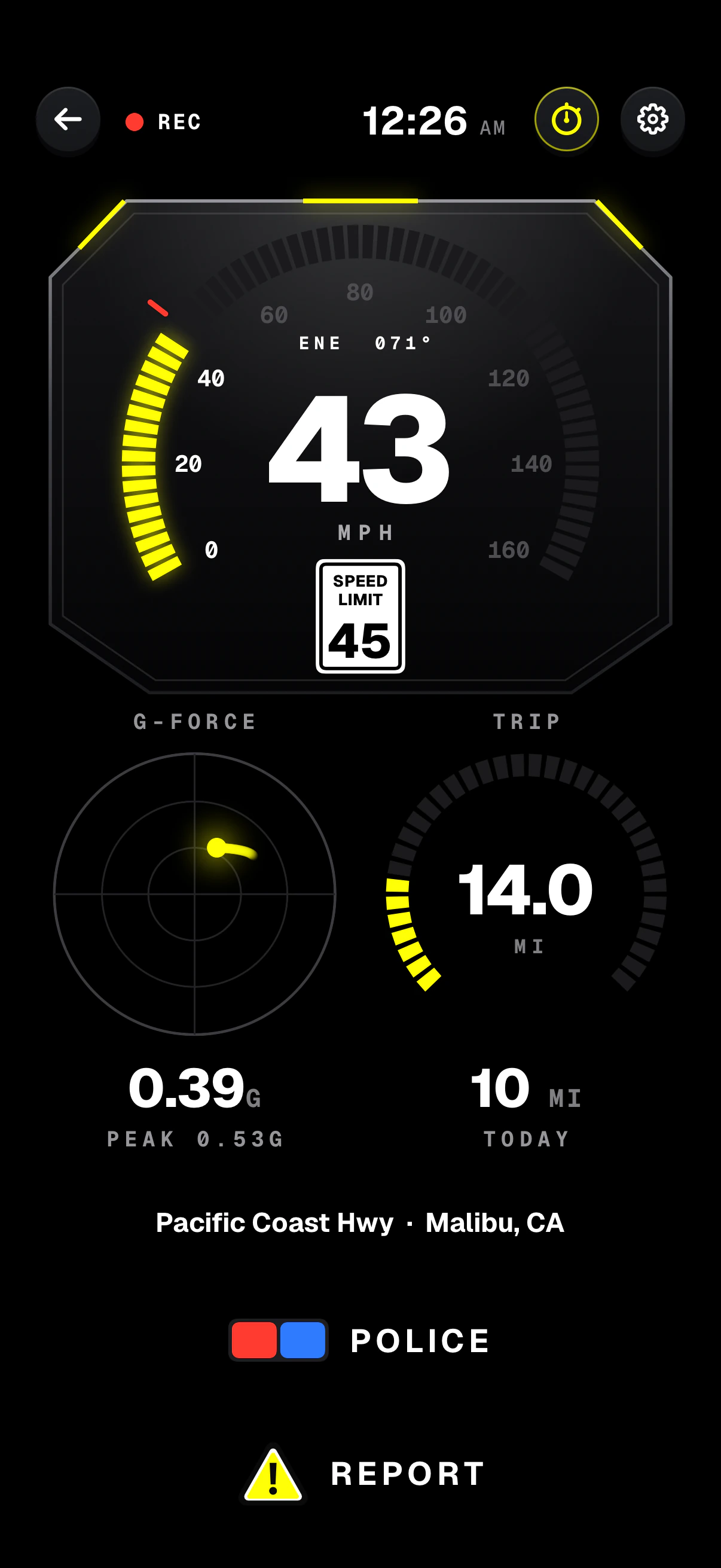
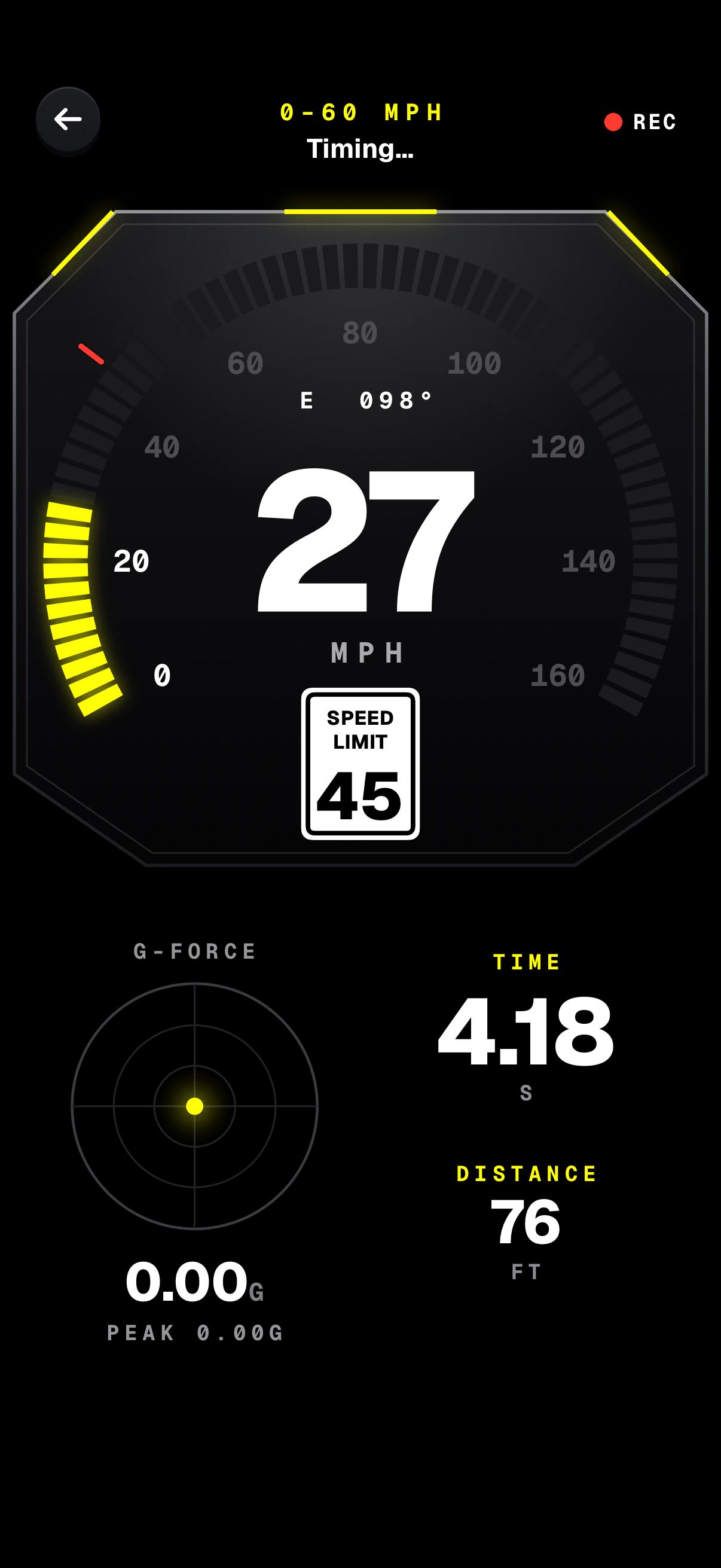
- Speed sweepYour speed on a supercar dial, with the heading above it.
- Posted limitThe limit for your road, right under your speed.
- G-forceLive, with the peak of the drive.
- POLICE & REPORTBig enough to hit without looking twice.
- The run0–60, 0–100, 60–0, 100–0, ¼, ½ and 1 mile; AUTO starts on the launch.
- Live speedYour speed while the clock runs.
- TimeThe result, stamped on the video.
- DistanceHow far the run has gone.
Performance timing is for closed courses only. Never race or speed on public roads.
03 · Body cam
Both cameras.
Both sides of it.
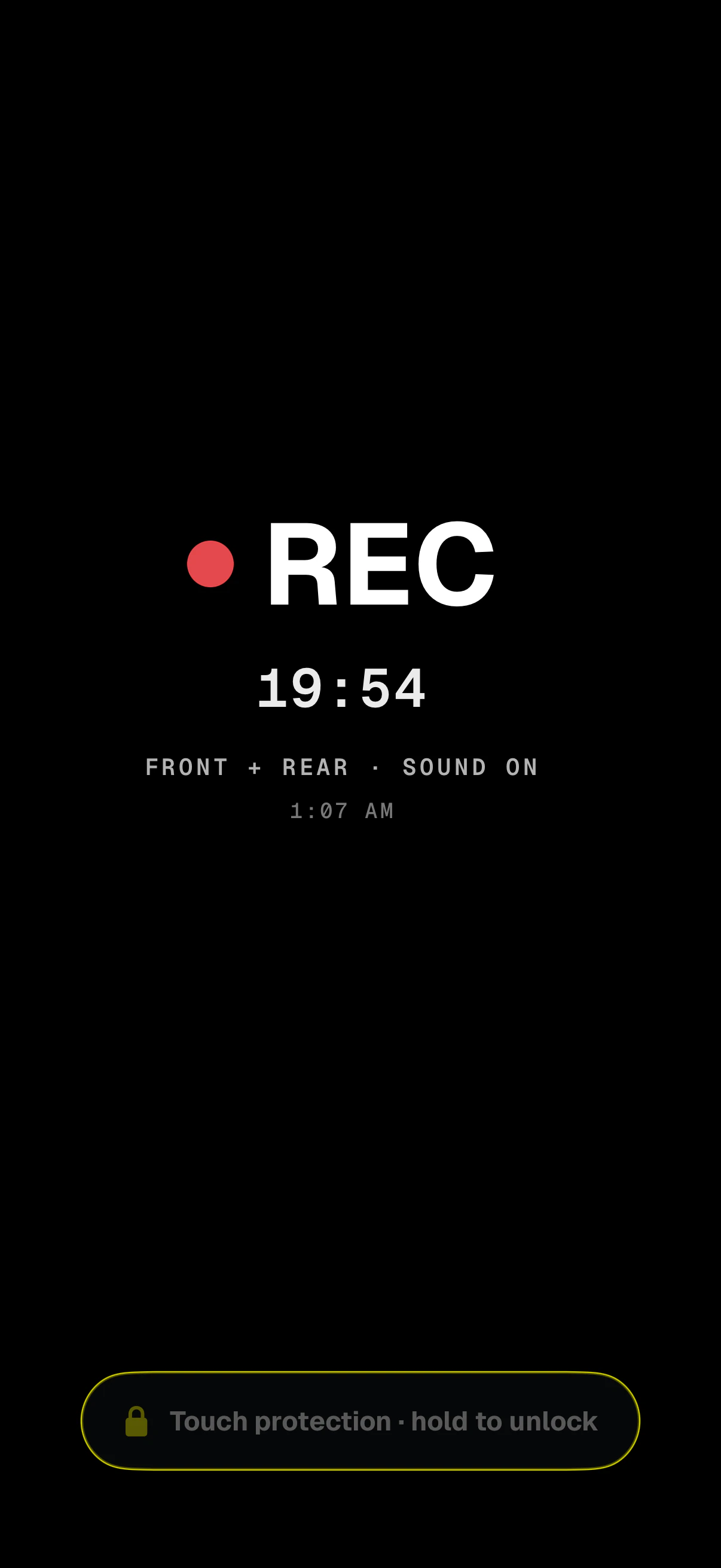
On foot, on a bike or in a rideshare, Dashivo records the front and rear cameras at once, with sound, each into its own file. Touch protection turns the screen dark and ignores every touch until you hold to unlock, so a pocket or a strap never stops it.
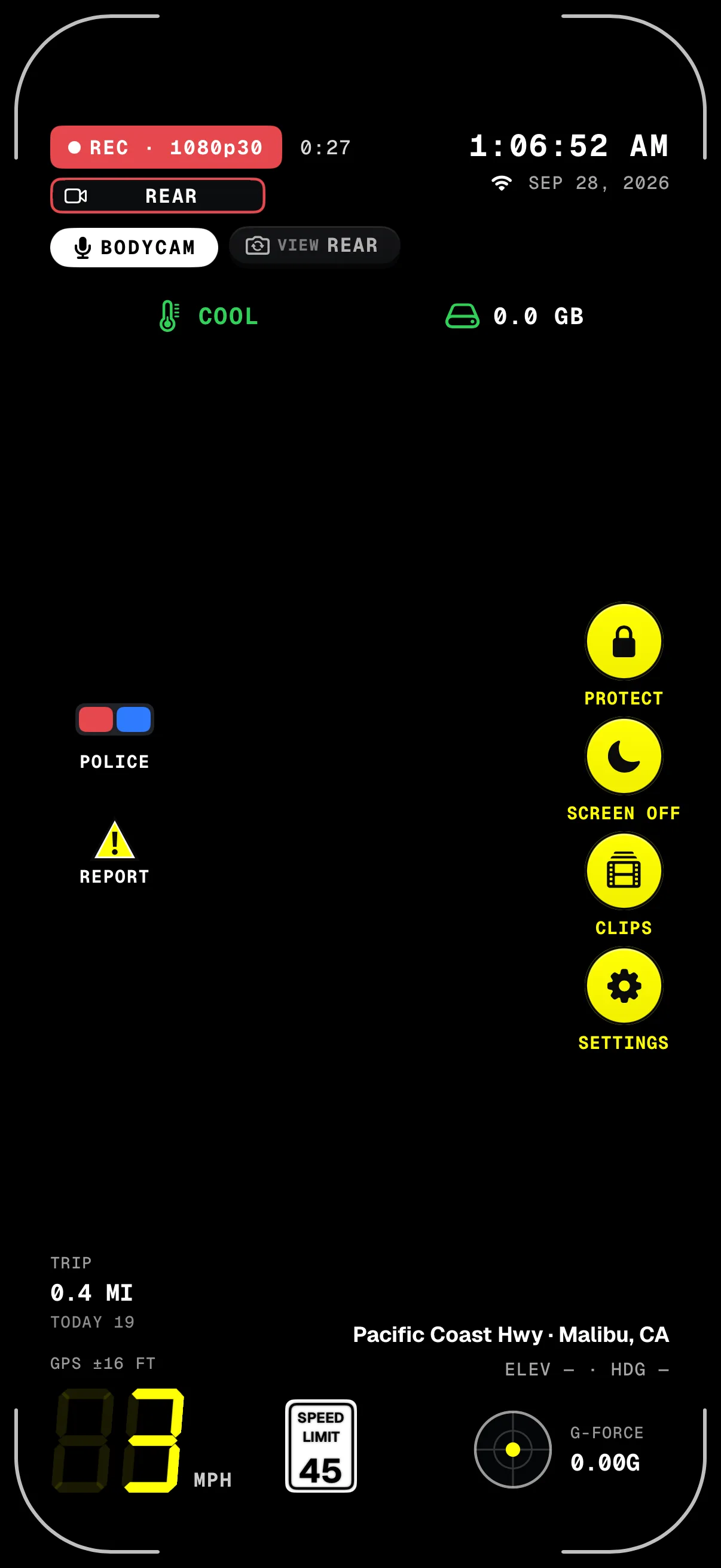
- BODYCAM · REARSound on; tap REAR to switch the camera you see. Both keep recording.
- POLICEA police stop works in body cam mode too.
- Speed & placeStamped on every frame, on foot or on a bike.
- Still recordingA big REC and how long it's been running.
- Front + rear, sound onEach camera saved as its own file, named to the second.
- Touch protectionEvery touch is ignored until you hold to unlock for 1.5 seconds.
Some states require everyone in a conversation to agree before it's recorded. Tell riders they're on camera; see recording laws.
03 · Police stop
One tap when the
lights come on.
Tap POLICE and every camera records until you end it, saved every few seconds, and the stop, and the 10 minutes before it, are kept safe from loop recording on your phone. STOP shows beside REC, and the POLICE button becomes the stop's timer. It works in dash cam and body cam mode.
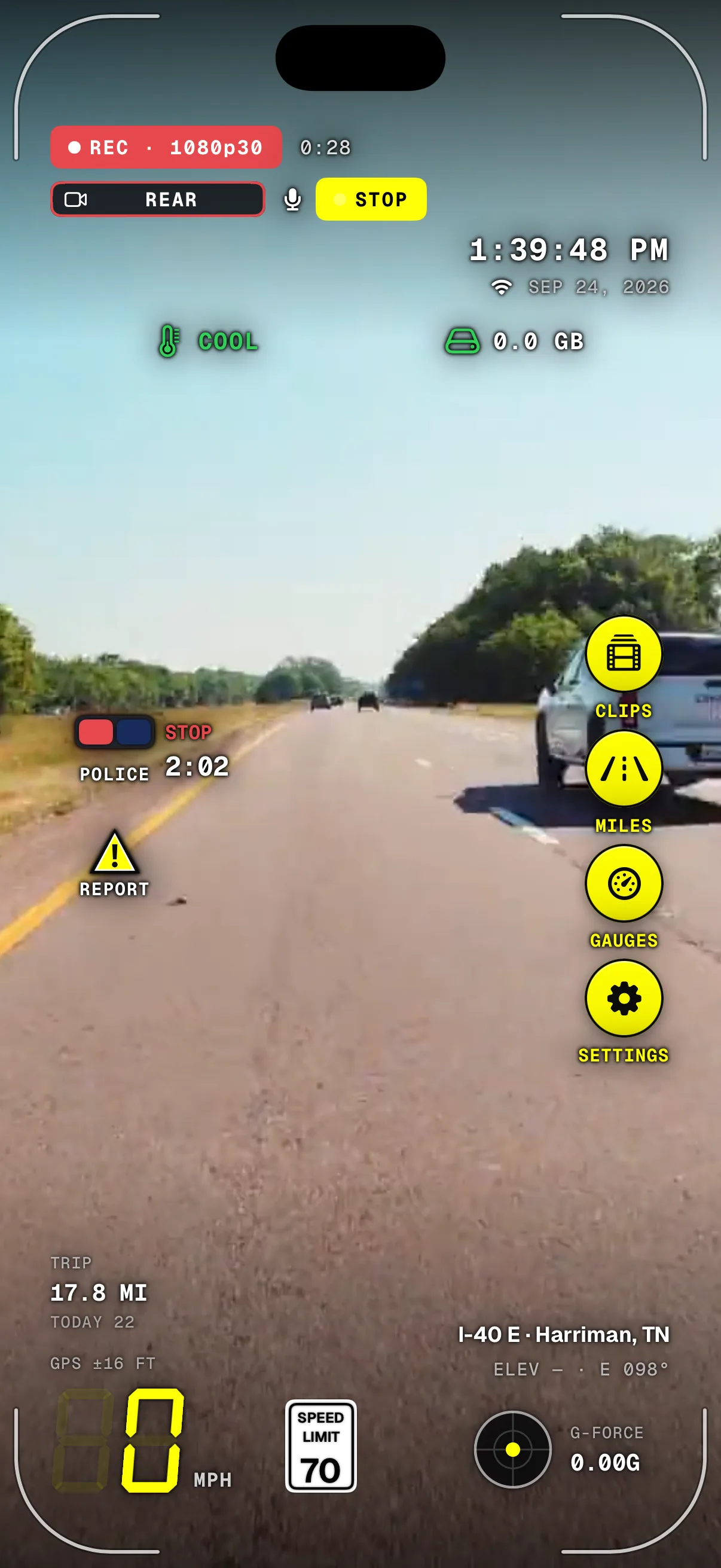
- REC carries onRecording never pauses for the stop.
- The stop timerPOLICE turns into the stop's clock; tap it to end the stop.
- Stopped, stamped0 mph, the time and the place, burned into every frame.
- STOP beside RECEvery camera is in police-stop mode, saved every few seconds.
- Clock & dateDown to the second, on every frame.
- Where it happenedStreet, city and heading, stamped too.
Dashivo documents; it doesn't accuse anyone. Keep your hands where the officer can see them and follow their instructions. This isn't legal advice.
04 · Privacy & app lock
Your footage, behind
your own lock.
Dashivo can ask for its own PIN, Face ID or both before anyone watches, shares or deletes a recording. It never uses your phone's passcode, never interrupts a drive, and recording carries on behind it. Without a Cloud plan, nothing leaves your phone.
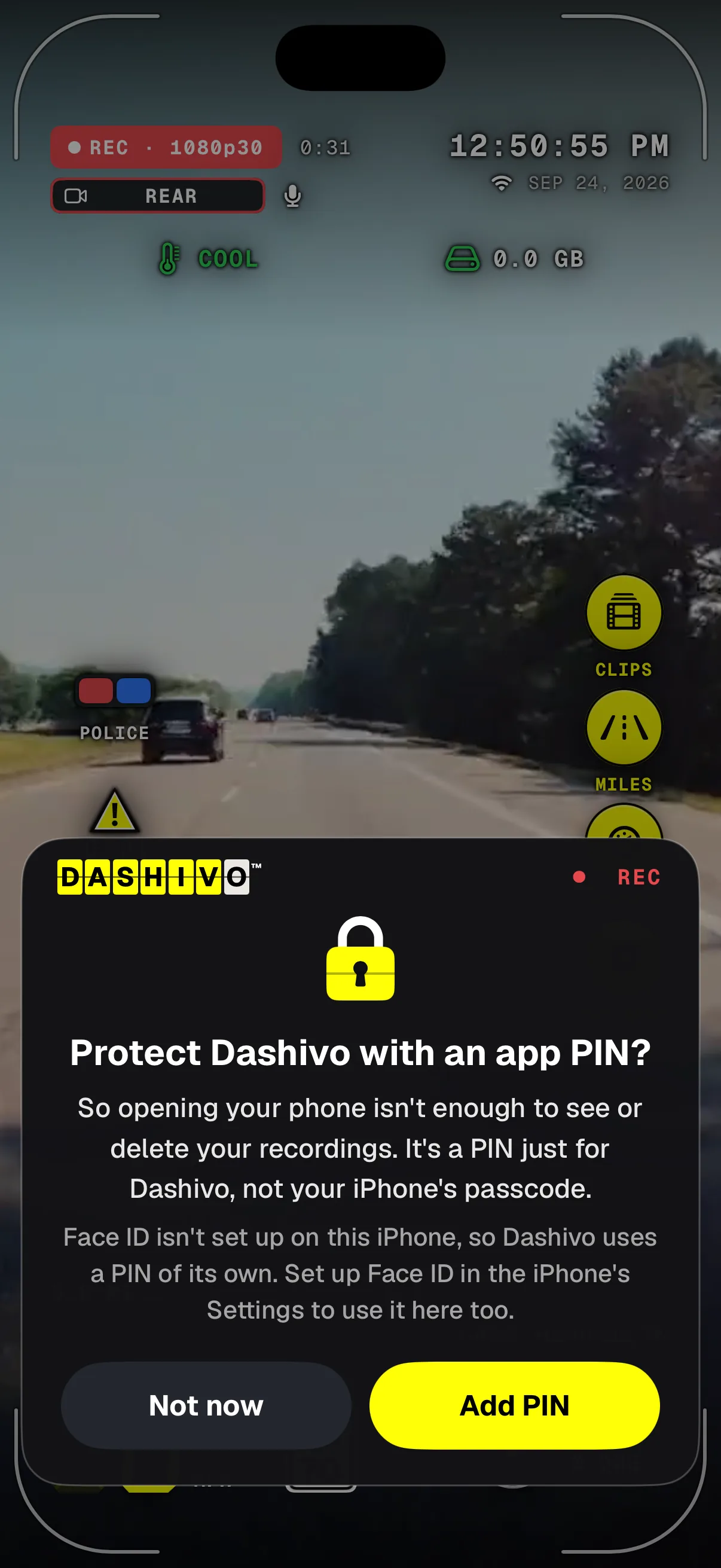
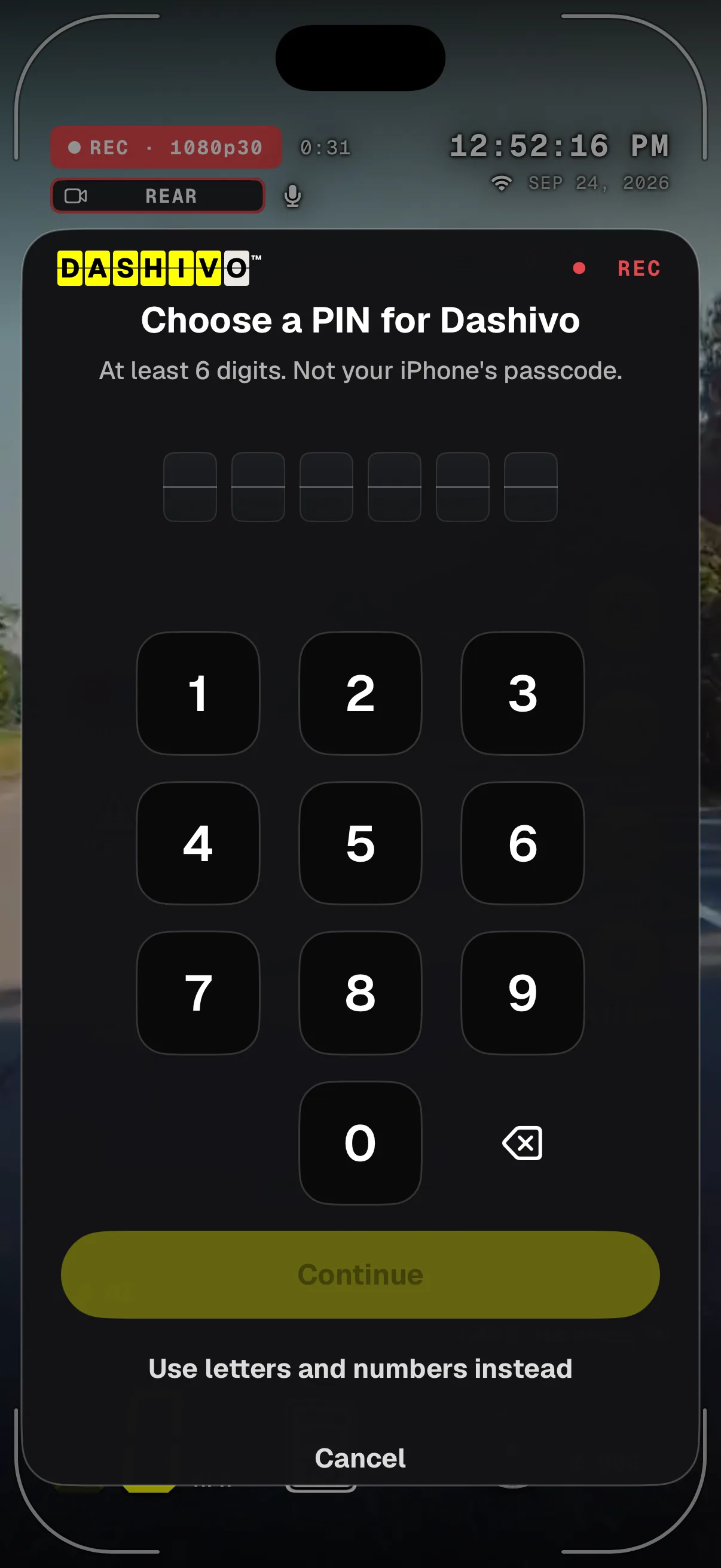
- Still recordingThe lock sits over the drive; recording carries on behind it.
- A lock of its ownOn top of your phone's lock, just for Dashivo.
- Unlocked isn't enoughSomeone holding your unlocked phone still can't watch or delete.
- Your choiceTurn it on now, or later in Settings.
- RECRecording never stops while it asks.
- Dashivo's own PINAt least 6 digits, never the iPhone's passcode.
- No wipesWrong PINs only cost time; nothing is ever erased.
- Letters tooOr a longer code with letters and numbers.
During a police stop and for 30 minutes after, you can have it ask for the PIN only, never Face ID.
Every part of the app
Take a
closer look.
Each part has its own page, with what it does today and what's coming. Anything marked Coming soon isn't in the app yet.
- Dash cam
Continuous loop recording, stamped with the time, speed and place.
- Body cam
Front and rear cameras at once, free, with sound, each its own file.
- ProRoad + cabin
Dash cam with both cameras: the road and your riders, with sound.
- Police stop
One tap: records until you end it, saved every few seconds.
- HUD & speed limits
Your speed, the posted limit, G-force and where you are.
- ProDashboard & Stopwatch
Supercar gauges and 0–60 timing on closed courses.
- Night mode
The main lens after dark, and a NIGHT tag by REC.
- Clips & evidence
Named to the second, protected, easy to save and share.
- Reports
Mark speed traps, hazards and accidents in one tap.
- Mileage & trips
Trips and daily miles, logged while you record.
- Multi-phone setups
One to four phones, one for every angle.
- Coming soonParked Guard
Bumps, impacts and break-ins while you're away.
- Privacy & security
App lock, touch protection, footage that stays yours.
- Cloud portal
Your account on the web; Cloud storage is coming soon.
- Setup guide
Mounting, first launch and the settings that matter.
- FAQ
Plain answers, from police stops to plans.
- Which phones work
Every model we know, newest first.
Works with
Use the phone you
already own.
No new gadget. Dashivo runs on the iPhone or Android phone you already carry, plugged into the car, and saves your clips where you can find them. Here's what it works with today, and what's coming.
Mount it anywhere
Use any phone mount that holds it steady. Mount the phone before you drive, and leave it alone on the road.
- WindshieldDash cam
- HandlebarBody cam
- ChestBody cam
Dashivo™ app
Works today
iPhone
iOS 17 or later. Apple only lets apps use the camera while they're on screen, so keep Dashivo open while it records.
Which phones workWorks with today
-
iOS 17 or later. Apple only lets apps use the camera while they're on screen, so keep Dashivo open while it records.
-
Android 10 or later. The phones page lists the models we've tested ourselves.
-
Save any clip to Photos on iPhone or to the Gallery on Android, or share it straight from the app.
-
Your clips are in the Files app, under On My iPhone › Dashivo, unless you choose to keep them inside Dashivo only.
-
With Pro, Android records straight to a USB-C drive. iPhone apps can't record to USB.
-
The HUD's speed-limit sign comes from OpenStreetMap, looked up with an approximate location. No sign where no limit is recorded.
-
Dashivo runs plugged in, from the car's USB port or a charger. Full quality stays on unless the phone gives its highest heat warning.
Coming soon
-
End-to-end encrypted copies of the clips that matter, route history and sharing. Your account at dashivo.app/account/ works today.
-
Private, offline storage hidden in the car, with a copy of every clip over its own Wi-Fi. The Custom is on preorder, shipping in Q4 2026.
-
A bump while you're parked sends an alert to your phone. It comes with Dashivo Cloud or the Hub.
-
Speed traps, hazards and accidents that other drivers report near you, with Dashivo Cloud. You can already mark your own.
Download
Drive with a
witness.
Dashivo™ is free for iPhone and Android. Get the app, mount your phone, and your next drive is on the record.
Nothing new to buy · No account needed · Footage stays on your phone