For iPhone & Android
App
Police stop
One tap: records until you end it, saved every few seconds.
Tap POLICE as you pull over, then leave the phone alone. Dashivo™ records on every camera until you end the stop, with no time limit, and saves it behind the scenes every few seconds, so each part is safe even if the phone is grabbed, knocked or switched off. It documents what happens; it never argues for you or accuses anyone.
- Records until you end itNo time limit. Tap POLICE again when it's over, and confirm.
- Saved every few secondsIn small pieces behind the scenes, each one finished and safe within seconds.
- Kept safe from the loopThe stop, and the 10 minutes before it, are kept safe from loop recording on your phone.
- REC carries onRecording never pauses for the stop.
- STOP beside RECA police stop is on: every camera records until you end it, saved every few seconds.
- Both camerasFRONT + REAR: the road ahead and the cabin, both side windows, with sound.
- Swap the viewVIEW switches which camera fills the screen; the other stays in the small picture, and both keep recording.
- The stop's clockPOLICE shows how long the stop has run. Tap it again to end the stop, and confirm.
- Stopped, stamped0 mph, the time and the place, burned into every frame, with POLICE STOP.
- Where it happenedStreet and city on screen; coordinates saved with every clip.
The iPhone app, recorded on a simulated stop; the camera pictures are an original 3D-rendered scene, with no real people or places.
When you tap POLICE
- 1 tap
- The red-and-blue POLICE button, on the camera screen and on the Dashboard.
- No limit
- It records until you tap POLICE again and confirm. What was recorded during the stop stays locked.
- Every few seconds
- Saved behind the scenes in small pieces, so each part is safe within seconds, even if the phone is grabbed, knocked or switched off.
- Kept safe
- The stop, and the 10 minutes before it, are kept safe from loop recording on your phone. With the app lock on, nobody without your PIN can watch, share or delete them.
- Both modes
- Dash cam or body cam: it works on every camera that's recording.
- On the stamp
- POLICE STOP is burned into every frame of the stop, with the time, the place and your speed.
The choice window, on or off
- A short window first
With Ask me first on, tapping POLICE shows a short window where you choose what happens for this stop, then Start.
Settings › Police stop · the default - Straight to recording
With Ask me first off, POLICE starts at once with the choices you've already set. Fastest when you're being pulled over.
Settings › Police stop
If you're pulled over
- 01
Pull over safely and tap POLICE as you do. Then leave the phone alone in its mount.
- 02
Keep your hands where the officer can see them, and follow their instructions.
- 03
Let Dashivo document what happens. It doesn't argue for you or accuse anyone.
- 04
When it's over, tap POLICE again and confirm. Everything recorded during the stop stays locked.
This isn't legal advice. In many places you may record officers doing their job in public, but the rules differ by state, and sound is treated differently from video. Read the recording laws overview.
Where it stands
Works today
- One-tap police stop on iPhone and Android, in dash cam and body cam mode
- Recording until you end it, saved every few seconds
- The stop and the 10 minutes before it kept safe from loop recording on the phone
- App lock: only your PIN during a stop and for 30 minutes after
Coming soon
- Dashivo Cloud: stop footage uploads as the stop starts, end-to-end encrypted
- Cloud+: an “if I'm detained” hand-off to people you choose
Dashivo Hub Coming Soon
- A copy of each piece on the hub as it's saved
- The 10 minutes before the stop locked on the hub
Saved while it
happens.
The recording is saved in small pieces, each one finished within seconds, and there's no time limit: it runs until you end the stop. A copy away from the phone is what makes it hard to lose.
On the phone alone, a phone that's taken or wiped takes its clips with it. Save clips to Photos or the Gallery, record to a USB-C drive (Android, Pro), and soon keep a copy in Dashivo Cloud or on the Dashivo Hub.
Face ID off.
Your PIN only.
With the app lock on, you can have Dashivo ask for its own PIN, never Face ID or a fingerprint, during a police stop and for 30 minutes after it. Dashivo locks as soon as it leaves the screen; while it's on screen and open, it stays open.
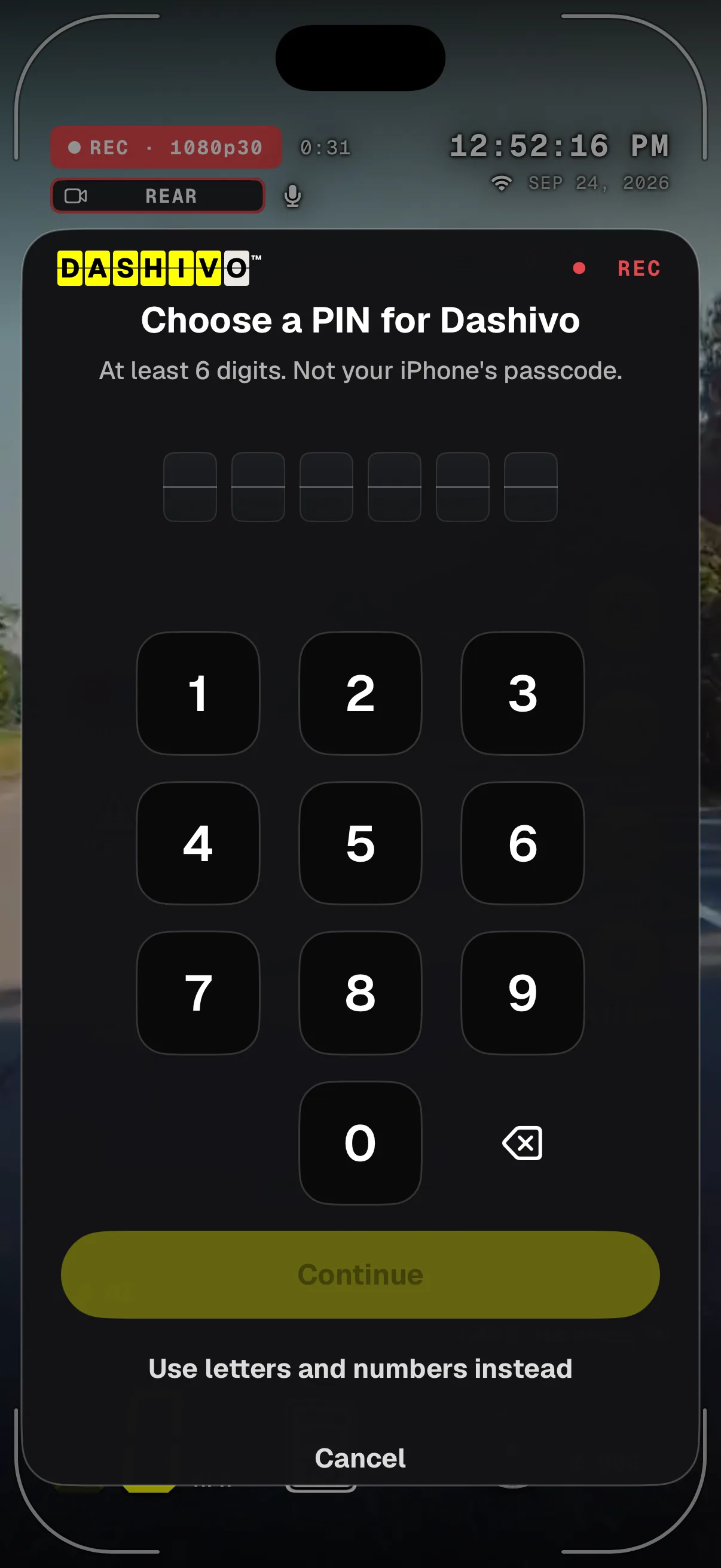
- Dashivo's own PINSix digits or more, just for Dashivo. Not your phone's passcode.
- No wipesWrong PINs only make you wait; nothing is ever erased, because the recordings are evidence.
- Still recordingThe lock sits over the drive; recording carries on behind it.
- Letters tooOr a longer passcode with letters and numbers.
Laws on unlocking phones differ by state and country. This isn't legal advice.
Download
Drive with a
witness.
Dashivo™ is free for iPhone and Android. Get the app, mount your phone, and your next drive is on the record.
Nothing new to buy · No account needed · Footage stays on your phone