For iPhone & Android
App
Dash cam
Continuous loop recording, stamped with the time, speed and place.
Mount the phone, plug it in and tap record. Dashivo™ records the road continuously, in a loop, like any dash cam, and burns the date and time, your speed and where you were into every frame. Full HD is free; 4K comes with Pro on phones that can record it.
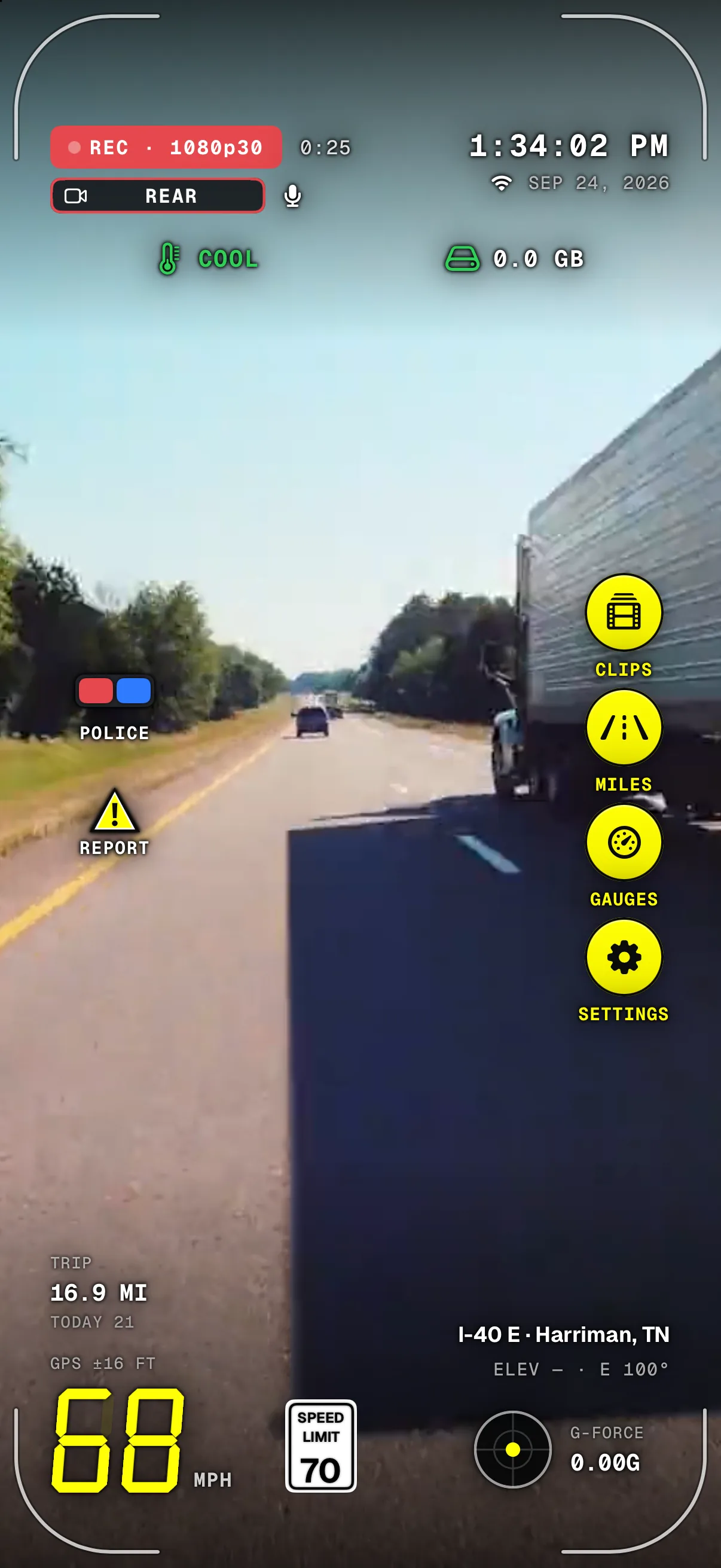
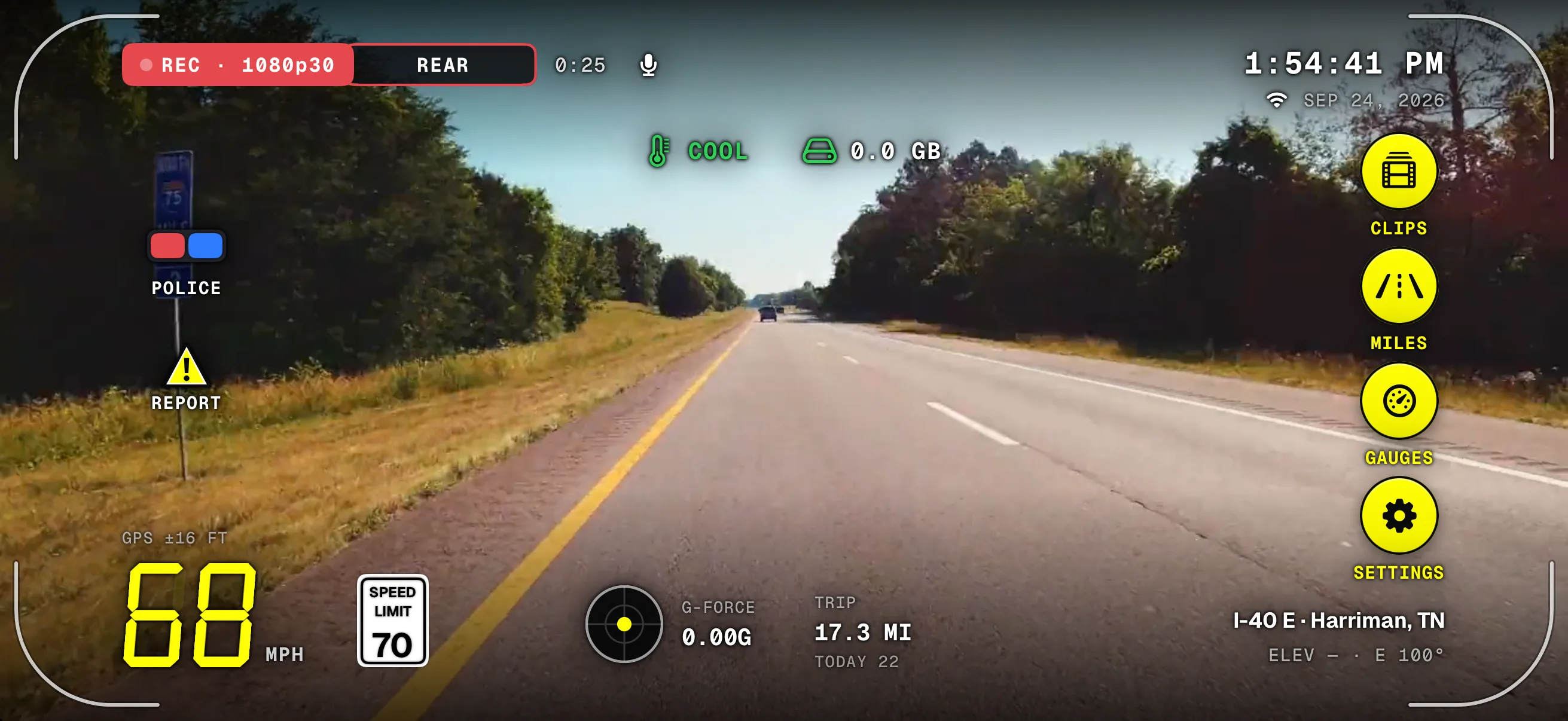
- REC & qualityRecording, in 4K with Pro or Full HD, and how long this recording has run.
- POLICEOne tap starts a police stop: it records until you end it.
- Speed & limitYour speed, with the posted limit for the road beside it.
- Clock & dateThe same date and time the stamp burns into every frame.
- The railClips, Miles, Gauges and Settings, one tap away while it records.
- Street & cityWhere you are, looked up on the phone. Coordinates are saved with every clip.
Screens from the iPhone app on a simulated drive, with a licensed road clip played as the camera for these captures.
What it records
- Continuous
- Recording in a loop with no gaps, saved behind the scenes in segments of 1 minute (30 seconds to 5 minutes in Settings).
- 4K
- With Pro, on phones that can record it. Full HD is free, on every phone.
- Best
- 4K, with plates readable from farther away, at about 7 GB an hour. Balanced is 1080p in about half the space and runs cooler; Space saver keeps the most hours.
- Extra wide
- On phones with an ultra-wide lens it also catches the lanes and sidewalks beside you. Normal matches what you see through the windshield.
- HEVC
- Files about a third smaller at the same quality. H.264 takes more space and plays on anything.
- Sound
- Records sound with every video unless you turn it off (Video › Record sound). Sound-recording laws vary; some places require everyone's consent, so turn it off where you need to. Recording laws.
- Either way up
- Mount the phone upright or sideways. The HUD turns with it, and the video plays the right way up.
- Plugged in
- Keep it on a charger while you drive: recording all trip long uses more power than most phones can run on battery.
- Full quality
- Until the phone gives its highest heat warning. Then it lowers the resolution until the phone has cooled for five minutes, and goes back.
On iPhone, Dashivo has to stay on screen to record: Apple only lets apps use the camera while they're on screen. Mount the phone before you drive and don't handle it on the road.
Loop recording, like any dash cam
- No gaps
- One segment follows the next with nothing lost between them, so one damaged file never costs you a whole trip.
- Oldest first
- When the space you set is full, the oldest recording makes room for the new one. Your photos and apps are never touched.
- Or keep it all
- Turn looping off and nothing is replaced: Dashivo keeps 2 GB free instead.
The stamp on every frame

It's part of the video itself, so it shows in any player and when you share a clip.
Example: the stamp drawn over an illustrated road, not footage.
How it works
- 01
Put the phone on a windshield or dash mount (a MagSafe-compatible or magnetic one is easiest), upright or sideways, and plug it in.
- 02
Tap record. Dashivo records continuously and saves the drive in segments behind the scenes.
- 03
Every frame carries the stamp: REC, the date and time, where you were, your speed, G-force and trip.
- 04
Your drives wait in Clips, by day. When the space you set is full, the oldest recording makes room.
Where it stands
Works today
- Continuous loop recording on iPhone and Android
- Full HD free; 4K with Pro on phones that can
- The stamp, the HUD and the speed-limit sign
- Night mode, on by default
- The road and the cabin at once, with Pro
Coming soon
- Copies of the clips that matter in Dashivo Cloud
Dashivo Hub Coming Soon
- A copy of every clip on a box hidden in the car, over its own Wi-Fi
- Impact protection
The road and the
cabin, with Pro.
Turn on Front and rear in Settings › Dash cam and Dash cam mode records both cameras at once: the road ahead on the rear camera, the cabin and your riders on the front camera, with sound, each into its own file. Everything else stays the same: the HUD, the speed-limit sign, the stamp and loop recording. Made for rideshare and delivery drivers on Uber, Lyft, DoorDash, Instacart and the rest.
- Pro · $9.99 once
- 1080p each while both record

- Road aheadThe rear camera, through the windshield. 1080p while both cameras record.
- CabinThe front camera, with sound: the front seats and your riders in the back.
- Magnetic mountBelow the mirror, where your state allows. It bends, tilts, swivels and rotates; phones without MagSafe take a thin plate.
- Second phoneOn the rear shelf or rear window: the road behind. Free, and it records on its own.
- USB-C powerKeep it charging, most of all with both cameras on. Each phone needs its own.
Each camera, its own fileNamed to the second, so the road, the cabin and the road behind line up.
- or on the dash
- or on the console
An original 3D illustration, not footage. Windshield mounting rules vary by state, so mount where yours allows; the dash or the console is the easy option. What's allowed
- Dash cam, road and cabin Pro
- For driving. The road fills the screen with the HUD and the posted limit; the cabin shows in a small picture; tap it to swap. Loop recording keeps going all shift.
- Body cam, front and rear
- Free, for on foot, on a bike or a phone you carry, with Touch protection and Screen off. Body cam
- Which phones
- iPhone XS and XR and newer, and many recent Android phones. On others, Front and rear is greyed out and the rear camera records as usual. Which phones work
- If the phone gets hot
- The cabin camera pauses first to cool the phone; the road never stops.
- Police stop
- POLICE works the same: every camera you choose records until you end the stop.
- Riders and sound
- Tell riders they're on camera. Check your platform's rules and your state's recording laws.
A magnetic mount you can aim
Any sturdy windshield, dash or console mount works. A magnetic one with a bendable arm makes it easy: the phone snaps on, the arm bends to where you want it, and the head tilts, swivels and turns until both cameras see what they should.
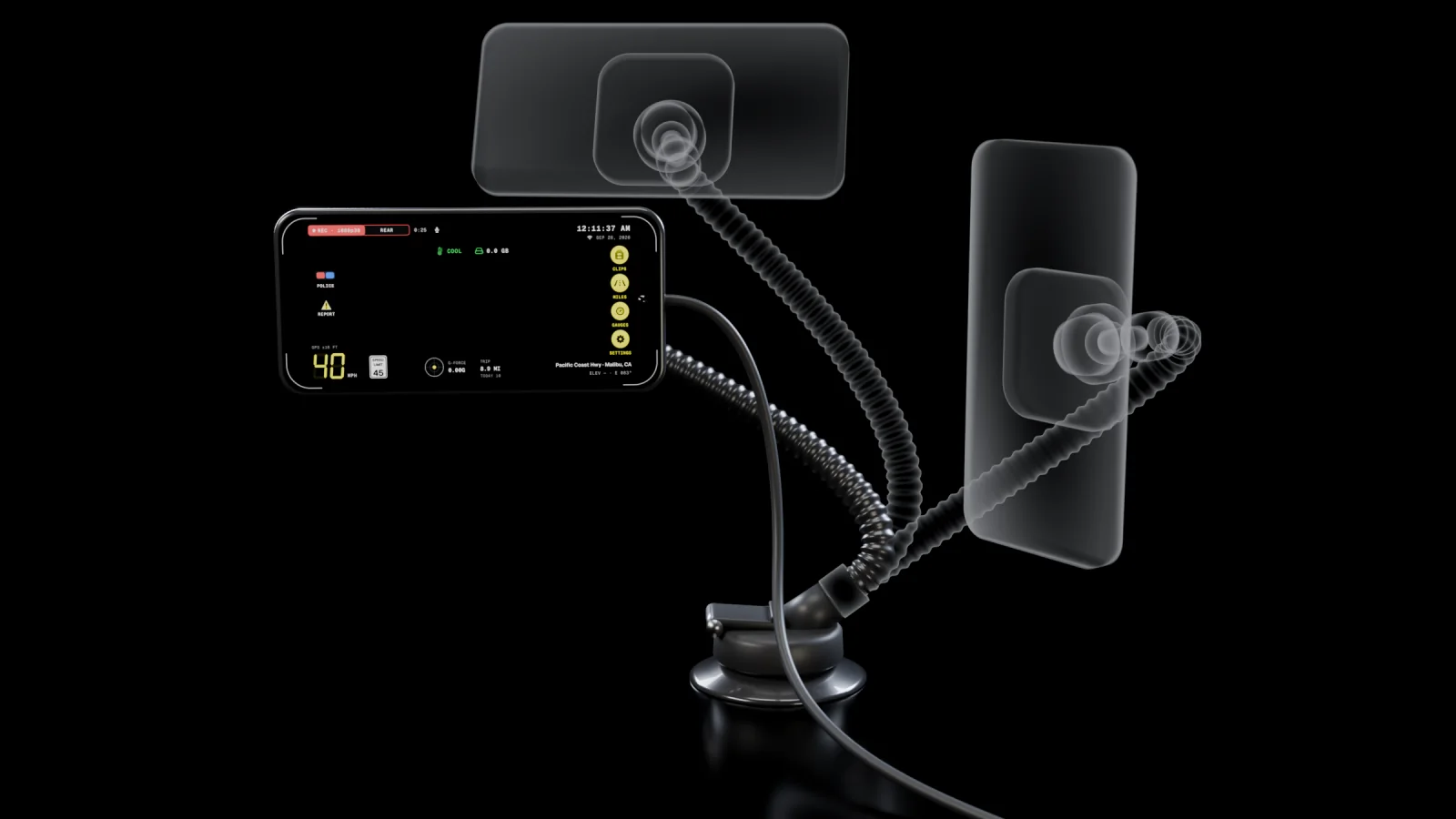
- BendThe arm holds any curve, so the phone sits just where you want it.
- Tilt and swivelThe ball joint aims the rear camera at the road and the front camera at both rear doors.
- RotateSideways or upright. The HUD turns with the phone.
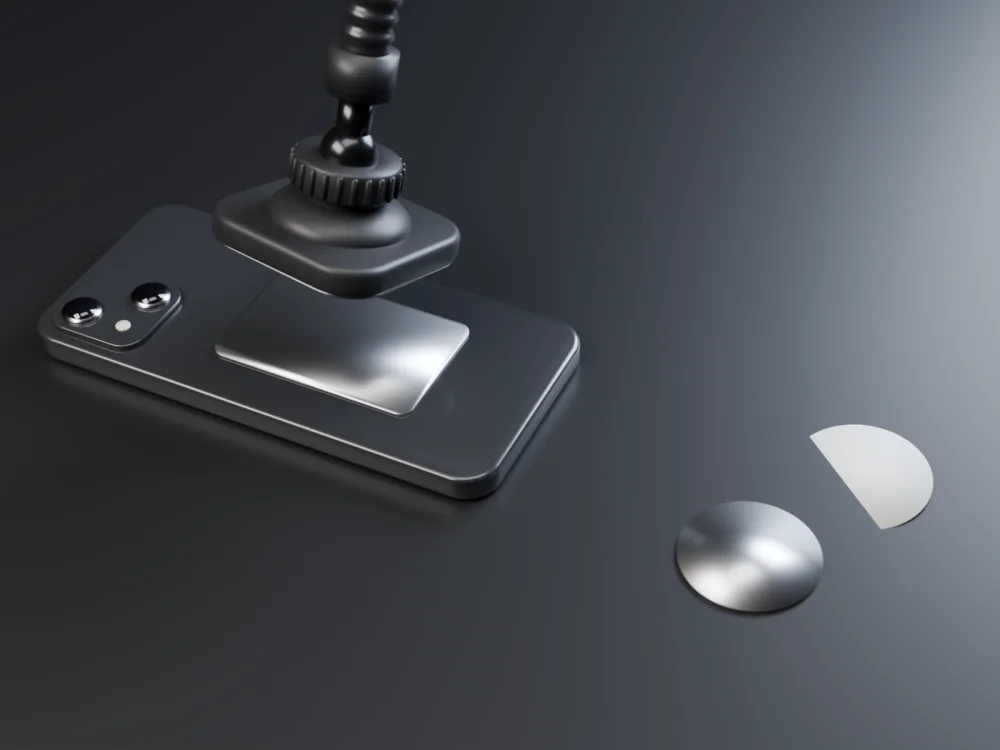
- Just below the mirror, in the middle of the windshield, where your state allows. From there the front camera sees over the seats and the rear camera over the hood. What to know
- Or on the dash or console. The easy option where windshield mounts are limited. Never in front of you: keep your view of the road clear.
- Keep it charging. Plug it into USB-C power: two cameras use more power than one.
- Out of direct sun, near an air vent when you can, so the phone stays cool.
- A second phone on the rear shelf or the rear window records the road behind, on its own, with its own charger.
- Set it up parked, then leave it alone while you drive.
Uber, Lyft, DoorDash and Instacart are trademarks of their owners. Dashivo isn't affiliated with them.
Set it once,
then drive.
Quality, the stamp, the mark and night mode share one page in Settings. Pick once and Dashivo remembers, on every drive.
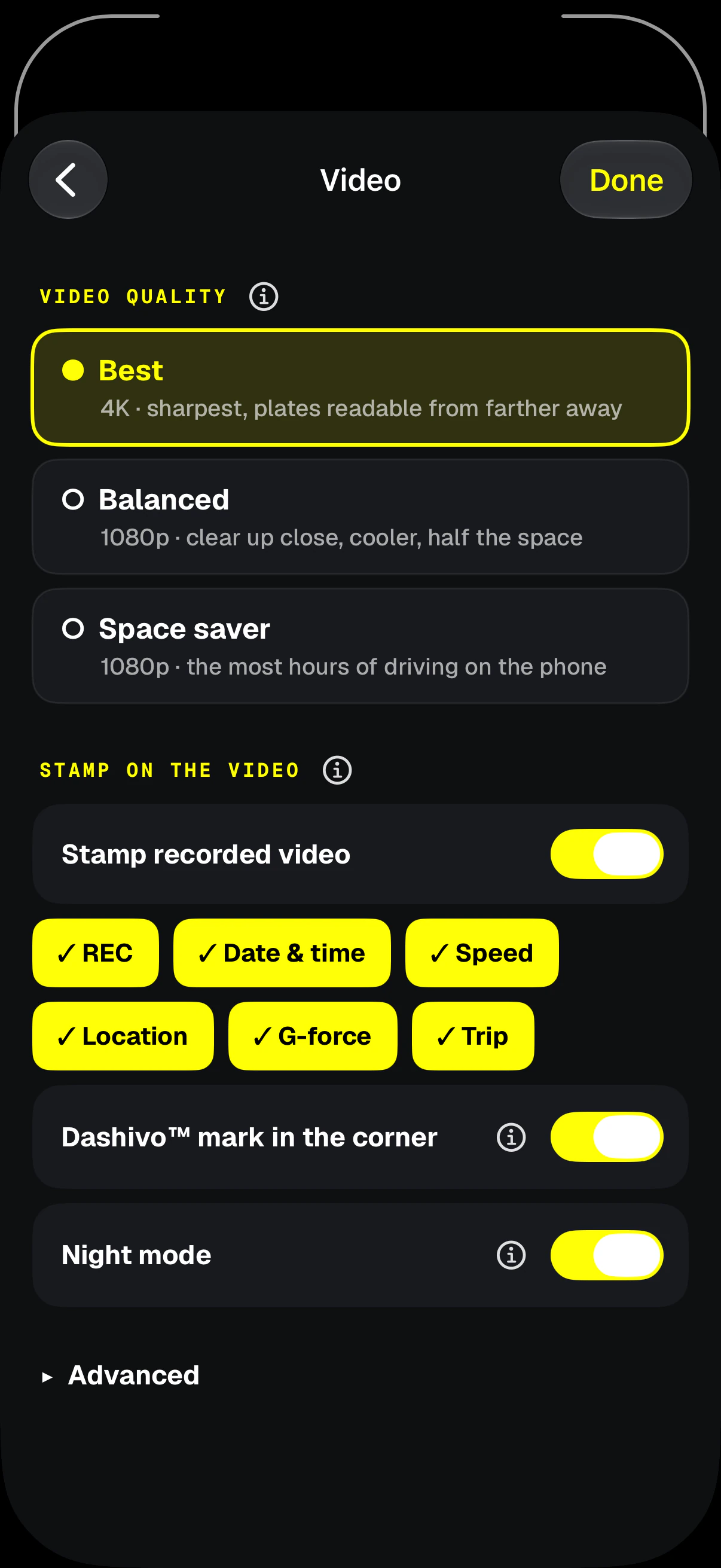
- Video qualityBest is 4K with Pro, about 7 GB an hour. Balanced is 1080p, cooler, in half the space. Space saver keeps the most hours.
- What's stampedREC, date and time, speed, location, G-force and trip: pick any.
- AdvancedResolution, frames per second, detail, HEVC or H.264, and segment length.
- Stamp onBurns the band into every recorded frame. The HUD on screen is never recorded.
- The Dashivo markA small mark above the stamp on free recordings. Pro lets you turn it off.
- Night modeOn by default: the main lens and a brighter picture after dark.
Download
Drive with a
witness.
Dashivo™ is free for iPhone and Android. Get the app, mount your phone, and your next drive is on the record.
Nothing new to buy · No account needed · Footage stays on your phone